Showing posts with label BOOK. Show all posts

Friday, 21 October 2016

*ALL C++ PROGRAMS of INSERTION AND DELETION OPERATIONS WITH OUTPUT*(DATA STRUCTURE)

*ALL C++ PROGRAMS of  INSERTION AND DELETION OPERATIONS WITH OUTPUT*(DATA STRUCTURE)

  • ->FOR PRGRAMS DOWNLOAD-HERE
  •  
  • C programming is a powerful general-purpose language. It is fast, portable and available in all platforms.
    If you are new to programming, C is a good choice to start your programming journey.
    This is a comprehensive guide on how to get started in C programming language, why you should learn it and how you can learn it.
    C is a general-purpose programming language used for wide range of applications from Operating systems like Windows and iOS to software that is used for creating 3D movies.
    C programming is highly efficient. That’s the main reason why it’s very popular despite being more than 40 years old.
    Standard C programs are portable. The source code written in one system works in another operating system without any change.
    As mentioned, it’s a good language to start learning programming. If you know C programming, you will not just understand how your program works, but you will also be able to create a mental picture on how a computer works.


(book)Book Of Operating system -BCA Student

Here is the book of OS for Bca Students
Link_--os download
The operating system (OS) is the most important program that runs on a computer. Every general-purpose computer must have an operating system to run other programs and applications. Computer operating systems perform basic tasks, such as recognizing input from the keyboard, sending output to the display screen, keeping track of files and directories on the disk, and controlling peripheral devices such as printers.
For large systems, the operating system has even greater responsibilities and powers. It is like a traffic cop -- it makes sure that different programs and users running at the same time do not interfere with each other. The operating system is also responsible for security, ensuring that unauthorized users do not access the system.
Operating System (OS)
              Image: Operating System (OS) Diagram
What You Need to Know About Office 365 & Windows 10

Classification of Operating systems


  • Multi-user: Allows two or more users to run programs at the same time. Some operating systems permit hundreds or even thousands of concurrent users.
  • Multiprocessing : Supports running a program on more than one CPU.
  • Multitasking : Allows more than one program to run concurrently.
  • Multithreading : Allows different parts of a single program to run concurrently.
  • Real time: Responds to input instantly. General-purpose operating systems, such as DOS and UNIX, are not real-time.
  • Operating systems provide a software platform on top of which other programs, called application programs, can run. The application programs must be written to run on top of a particular operating system. Your choice of operating system, therefore, determines to a great extent the applications you can run. For PCs, the most popular operating systems are DOS, OS/2, and Windows, but others are available, such as Linux.
    Operating System Recommended Reading: The History of Windows Operating Systems (Windows OS) from 1985 to present day.

    Interacting With the Operating System

    As a user, you normally interact with the operating system through a set of commands. For example, the DOS operating system contains commands such as COPY and RENAME for copying files and changing the names of files, respectively. The commands are accepted and executed by a part of the operating system called the command processor or command line interpreter. Graphical user interfaces allow you to enter commands by pointing and clicking at objects that appear on the screen.

    (Book) Book of STATISTICS~BCA STUDENT

    We have students taking individual courses or enrolled in one of our PASS certificate programs, and instructors teaching our courses from around the globe.
    The Institute for Statistics Education at Statistics.com is the leading provider of online education in statistics, and offers over 100 courses in introductory and advanced statistics. Students from around the world study with leading authorities in statistics via private discussion boards on flexible schedules. Teaching assistants provide individual feedback on practical exercises.  The Institute offers CEU's, records of course completion, and certificate programs in advanced statistical study.
    Statistics.com has been teaching statistics online since 2002, with approximately 1300 students taking courses annually, and (as of November 2015) 140 enrolled in a certificate program.  The completion rate for certificate programs is 70%.  The Institute for Statistics Education is is certified to operate by the State Council of Higher Education for Virginia (SCHEV).


    Read articles and papers about The Institute's role in a changing educational environment, a recent profile of it's president, Peter Bruce, and more:

    For more information, see

    (Book) COMPUTER ORGANIZATION AND ADVANCE MICROPROCESSOR

    Microprocessing unit is synonymous to central processing unit, CPU used in traditional computer. Microprocessor (MPU) acts as a device or a group of devices which do the following tasks.
    • communicate with peripherals devices
    • provide timing signal
    • direct data flow
    • perform computer tasks as specified by the instructions in memory

    8085 Microprocessor

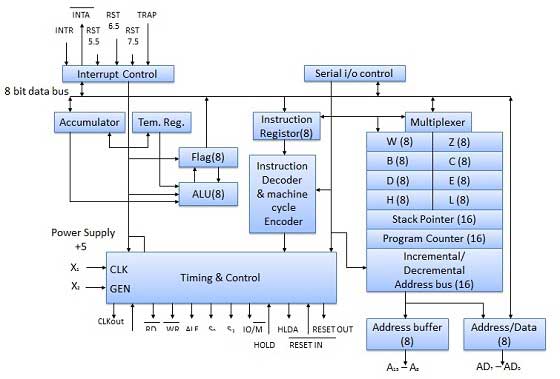
    The 8085 microprocessor is an 8-bit general purpose microprocessor which is capable to address 64k of memory. This processor has forty pins, requires +5 V single power supply and a 3-MHz single-phase clock.

    Block Diagram

    8080 Mircroprocessor block diagram

    ALU

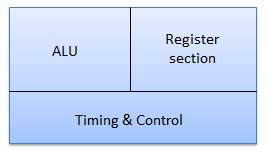
    The ALU perform the computing function of microprocessor. It includes the accumulator, temporary register, arithmetic & logic circuit & and five flags. Result is stored in accumulator & flags.

    Block Diagram

    ALU

    Accumulator

    It is an 8-bit register that is part of ALU. This register is used to store 8-bit data & in performing arithmetic & logic operation. The result of operation is stored in accumulator.

    Diagram

    Accumulator

    Flags

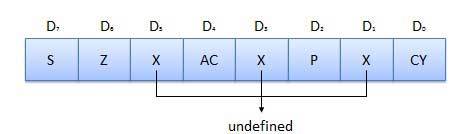
    Flags are programmable. They can be used to store and transfer the data from the registers by using instruction. The ALU includes five flip-flops that are set and reset according to data condition in accumulator and other registers.
    • S (Sign) flag − After the execution of an arithmetic operation, if bit D7of the result is 1, the sign flag is set. It is used to signed number. In a given byte, if D7 is 1 means negative number. If it is zero means it is a positive number.
    • Z (Zero) flag − The zero flag is set if ALU operation result is 0.
    • AC (Auxiliary Carry) flag − In arithmetic operation, when carry is generated by digit D3 and passed on to digit D4, the AC flag is set. This flag is used only internally BCD operation.
    • P (Parity) flag − After arithmetic or logic operation, if result has even number of 1s, the flag is set. If it has odd number of 1s, flag is reset.
    • C (Carry) flag − If arithmetic operation result is in a carry, the carry flag is set, otherwise it is reset.

    Register section

    It is basically a storage device and transfers data from registers by using instructions.
    • Stack Pointer (SP) − The stack pointer is also a 16-bit register which is used as a memory pointer. It points to a memory location in Read/Write memory known as stack. In between execution of program, sometime data to be stored in stack. The beginning of the stack is defined by loading a 16-bit address in the stack pointer.
    • Program Counter (PC) − This 16-bit register deals with fourth operation to sequence the execution of instruction. This register is also a memory pointer. Memory location have 16-bit address. It is used to store the execution address. The function of the program counter is to point to memory address from which next byte is to be fetched.
    • Storage registers − These registers store 8-bit data during a program execution. These registers are identified as B, C, D, E, H, L. They can be combined as register pair BC, DE and HL to perform some 16 bit operations.
      Here is the link of this book~~~Book download

    DATA STRUCTURE BOOK GUJARAT UNIVERSITY BCA SEM 3

    C/C++ arrays allow you to define variables that combine several data items of the same kind but structure is another user defined data type which allows you to combine data items of different kinds.
    Structures are used to represent a record, suppose you want to keep track of your books in a library. You might want to track the following attributes about each book:
    • Title
    • Author
    • Subject
    • Book ID

    Defining a Structure:

    To define a structure, you must use the struct statement. The struct statement defines a new data type, with more than one member, for your program. The format of the struct statement is this:
    struct [structure tag]
    {
       member definition;
       member definition;
       ...
       member definition;
    } [one or more structure variables];  
    The structure tag is optional and each member definition is a normal variable definition, such as int i; or float f; or any other valid variable definition. At the end of the structure's definition, before the final semicolon, you can specify one or more structure variables but it is optional. Here is the way you would declare the Book structure:
    struct Books
    {
       char  title[50];
       char  author[50];
       char  subject[100];
       int   book_id;
    }book;  

    Accessing Structure Members:

    To access any member of a structure, we use the member access operator (.). The member access operator is coded as a period between the structure variable name and the structure member that we wish to access. You would usestruct keyword to define variables of structure type. Following is the example to explain usage of structure

    Pointers to Structures:

    You can define pointers to structures in very similar way as you define pointer to any other variable as follows:
    struct Books *struct_pointer;
    Now, you can store the address of a structure variable in the above defined pointer variable. To find the address of a structure variable, place the & operator before the structure's name as follows:
    struct_pointer = &Book1;
    To access the members of a structure using a pointer to that structure, you must use the -> operator as follows:
    struct_pointer->title;
    Let us re-write above example using structure pointer, hope this will be easy for you to understand the concept
    Here is the link of papers~~DOWNLOAD