Friday, 21 October 2016

HOW TO CHANGE MAC ADDRESS IN WINDOWS PC.

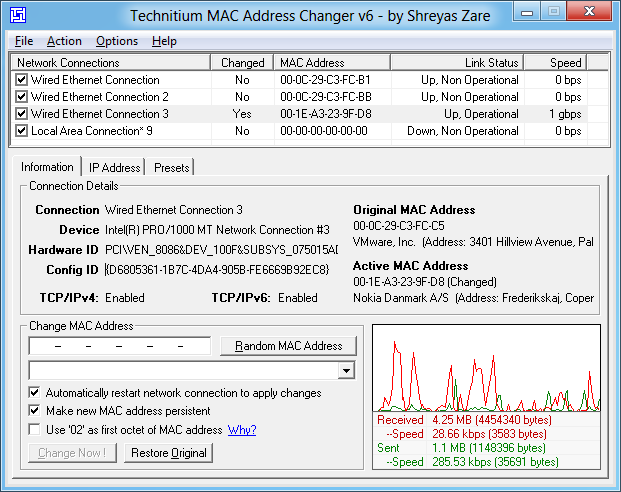
Technitium MAC Address Changer Screen Shot
1.FIRST OF ALL DOWNLOAD THIS SOFTWARE-DOWNLOAD
2.INSTALL THE SOFWARE.
3.CHANGE YOUR CURRENT MAC TO ANOTHER RANDOM MAC ADDRESS.

  • Static IP Assignment: Routers allow you to assign static IP addresses to your computers. When a device connects, it always receives a specific IP address if it has a matching MAC address
  • MAC Address Filtering: Networks can use MAC address filtering, only allowing devices with specific MAC addresses to connect to a network. This isn’t a great security tool because people can spoof their MAC addresses.
  • MAC Authentication: Some Internet service providers may require authentication with a MAC address and only allow a device with that MAC address to connect to the Internet. You may need to change your router or computer’s MAC address to connect.
  • Device Identification: Many airport Wi-Fi networks and other public Wi-Fi networks use a device’s MAC address to identify it. For example, an airport Wi-Fi network might offer a free 30 minutes and then ban your MAC address from receiving more Wi-Fi. Change your MAC address and you could get more Wi-Fi. (Free, limited Wi-Fi may also be tracked using browser cookies or an account system.)
  • Device Tracking: Because they’re unique, MAC addresses can be used to track you. When you walk around, your smartphone scans for nearby Wi-Fi networks and broadcasts its MAC address. A company named Renew London used trash bins in the city of London to track people’s movements around the city based on their MAC addresses. Apple’s iOS 8 will use a random MAC address each time it scans for nearby Wi-Fi networks to prevent this sort of tracking.
Bear in mind that each network interface has its own MAC address. So, on a typical laptop with both a Wi-Fi radio and a wired Ethernet port, the wireless and wired network interface each have unique, separate MAC addresses.
find-mac-addresses-with-ipconfig-all-on-windows

Windows

Most network cards will allow you to set a custom MAC address from their configuration panes in the Device Manager, although some network drivers may not support this feature.
First, open the Device Manager. On Windows 8.1, press Windows Key + X and click Device Manager. On Windows 7, press the Windows key, type “Device Manager” to search for it, and click Device Manager.
Locate the network interface you want to modify under Network Adapters, right-click it, and select Properties.
modify-network-interface-properties
Click the Advanced tab and select Network Address in the list. Your network driver doesn’t support this feature if the option isn’t here.
Enable the Value option and enter your desired MAC address without any separating characters — don’t use dashes or colons. Click OK afterward.
spoof-mac-address-on-windows

Enable Hidden Feature in Whatsapp - Video Call& Many more.

WhatsApp is customized daily by some of the modders. There are many good features of WhatsApp is launched daily. People use WhatsApp daily and while using WhatsApp you might be unhappy with WhatsApp customization. I mean watching green color everytime. Today, I am going to tell you the best way to customize your WhatsApp.
There are many hidden features available in official WhatsApp application. But to turn on those option you need to do editing in shared pref folder in your WhatsApp application root directory.
Now, there are several codes to turn every option in WhatsApp instead you can use WA Tweak application to enable those feature and the code will be automatically written in that file. You don’t need to do anything.
Actually As You all Know Whatsapp is Used to Chat, Message with Love ones but there are Thousand of People Who are Even waiting for Video Calling | Multicast | Invite Group Link and Many More Feature You Can Enable with WATWEAKS. In Internet there's a Fake one named WAEnabler Don't use It it's a Spam.

FEATURES
  • Video Calling in Official Whatsapp
  • Create Group Invitation Link
  • Anti Expired
  • Send One Message to Everyone in one Click
  • Share with FB Option
  • Added Disable calls Specific Contact

  • Added Ability to See last seen in Contact Tab
  • Added Anti Lag Codes
  • privacy mod
  • Media Limit Mod
  • In App Emoji Changer
  • Send GIFs File in One Click
  •  open Whatsapp And You Can Do Whatever Included in this WaTweaks Apk
  • LINKS

How to Translate Anything Instantly Using Your Smartphone Camera.

Smartphones has totally Changed Our Lives in Less than a Decade. Today We Can Perform Every Task with Your Smartphone. 
Features
  • Ability to Translate Between 103 Language by Typing
  • Pop Up Translate - Copy your Text From Any Apps and a Pop Up With Appear with a Translated Text
  • Translate Between 52 Language When You Have no Internet.
  • Use Your Camera To Translate it
  • Draw Character Instead of using the Keyboard n 93 languages
  • Easy to Use Features
  • Save the Translation for Further Uses
  • This App is available for iOS & Android
  • >>>>Click Here to Download that Google Translate Application
  • Open the App and Set Up the Translator. Select the Primary language and the Language You want to Translate. Tap the Translate Offline Option So You can Use It When You have No Internet Access and Click on Finish..
  • For some languages, Google Translate can pronounce translated text, highlight corresponding words and phrases in the source and target text, and act as a simple dictionary for single-word input. If "Detect language" is selected, text in an unknown language can be identified.[6]
    In the web interface, users can suggest alternate translations, such as for technical terms, or correct mistakes. These suggestions may be included in future updates to the translation process. If a user enters a URL in the source text, Google Translate will produce a hyperlink to a machine translation of the website. For some languages, text can be entered via an on-screen keyboard, handwriting recognition, or speech recognition.[6] It is possible to enter searches in a source language that are first translated to a destination language allowing one to browse and interpret results from the selected destination language in the source language.

    Browser integration

    Google Translate is available in some browsers as an extension which can run the translation engine.
    A number of Firefox extensions exist for Google services, and likewise for Google Translate, which allow right-click command access to the translation service.[7]
    An extension for Google's Chrome browser also exists;[8] in February 2010, Google Translate was integrated into the standard Google Chrome browser for automatic webpage translation.[9][10]

    Mobile apps

    The Google Translate app for Android and iOS supports more than 90 languages and can translate 37 languages via photo, 32 via voice in "conversation mode", and 27 via real-time video in "augmented reality mode".[11]
    The Android app was released in January 2010, while an HTML5 web application was released for iOS users in August 2008, followed by a native app on February 8, 2011.[12]
    An early 2011 version supported Conversation Mode when translating between English and Spanish (in alpha testing). This interface within Google Translate allows users to communicate fluidly with a nearby person in another language. In October 2011 it was expanded to 14 languages.[13]
    The 'Camera input' functionality allows users to take a photograph of a document, signboard, etc. Google Translate recognises the text from the image using optical character recognition (OCR) technology and gives the translation. Camera input is not available for all languages.
    In January 2015, the application gained the ability to translate text in real time using the device's camera, as a result of Google's acquisition of the Word Lens app.[14] The speed and quality of real-time video translation (augmented reality) feature were further enhanced in July 2015 with the release of a new implementation that utilizes convolutional neural networks.[15][16]
    On May 11, 2016, Google introduced Tap to Translate for Google Translate for Android. Upon highlighting text in an app that is in a foreign language, Translate will pop up inside of the app and offer translations.[17]


Bypass windows login security

If the audit policy is set to record logins, a successful login results in the user's user name and computer name being logged as well as the user name they are logging into.[3] Depending on the version of Windows and the method of login, the IP address may or may not be recorded. Windows 2000 Web Server, for instance, does not log IP addresses for successful logins, but Windows Server 2003 includes this capability.[4] The categories of events that can be logged are:[5]
The sheer number of loggable events means that security log analysis can be a time-consuming task.[6] Third-party utilities have been developed to help identify suspicious trends. It is also possible to filter the log using customized criteria. Logging is dangerous.

Attacks and countermeasures

Administrators are allowed to view and clear the log (there is no way to separate the rights to view and clear the log).[7] In addition, an Administrator can use Winzapper to delete specific events from the log. For this reason, once the Administrator account has been compromised, the event history as contained in the Security Log is unreliable.[8] A defense against this is to set up a remote log server with all services shut off, allowing only console access.[9]
As the log approaches its maximum size, it can either overwrite old events or stop logging new events. This makes it susceptible to attacks in which an intruder can flood the log by generating a large number of new events. A partial defense against this is to increase the maximum log size so that a greater number of events will be required to flood the log. It is possible to set the log to not overwrite old events, but as Chris Benton notes, "the only problem is that NT has a really bad habit of crashing when its logs become full".[10]
Randy Franklin Smith's Ultimate Windows Security points out that given the ability of administrators to manipulate the Security Log to cover unauthorized activity, separation of duty between operations and security-monitoring IT staff, combined with frequent backups of the log to a server accessible only to the latter, can improve security.[11]
Another way to defeat the Security Log would be for a user to log in as Administrator and change the auditing policies to stop logging the unauthorized activity he intends to carry out. The policy change itself could be logged, depending on the "audit policy change" setting, but this event could be deleted from the log using Winzapper; and from that point onward, the activity would not generate a trail in the Security Log.[5]
Microsoft notes, "It is possible to detect attempts to elude a security monitoring solution with such techniques, but it is challenging to do so because many of the same events that can occur during an attempt to cover the tracks of intrusive activity are events that occur regularly on any typical business network".[12]
As Benton points out, one way of preventing successful attacks is security through obscurity. Keeping the IT department's security systems and practices confidential helps prevent users from formulating ways to cover their tracks. If users are aware that the log is copied over to the remote log server at :00 of every hour, for instance, they may take measures to defeat that system by attacking at :10 and then deleting the relevant log events before the top of the next hour.[10]
Log manipulation is not needed for all attacks. Simply being aware of how the Security Log works can be enough to take precautions against detection. For instance, a user wanting to log in to a fellow employee's account on a corporate network might wait until after hours to gain unobserved physical access to the computer in their cubicle; surreptitiously use a hardware keylogger to obtain their password; and later log in to that user's account through Terminal Services from a Wi-Fi hotspot whose IP address cannot be traced back to the intruder.
After the log is cleared through Event Viewer, one log entry is immediately created in the freshly cleared log noting the time it was cleared and the admin who cleared it. This information can be a starting point in the investigation of the suspicious activity.
In addition to the Windows Security Log, administrators can check the Internet Connection Firewall security log for clues.

Writing false events to the log

It is theoretically possible to write false events to the log. Microsoft notes, "To be able to write to the Security log, SeAuditPrivilege is required. By default, only Local System and Network Service accounts have such privilege".[13] Microsoft Windows Internals states, "Processes that call audit system services . . . must have the SeAuditPrivilege privilege to successfully generate an audit record".[14] The Winzapper FAQ notes that it is "possible to add your own 'made up' event records to the log" but this feature was not added because it was considered "too nasty," a reference to the fact that someone with Administrator access could use such functionality to shift the blame for unauthorized activity to an innocent party.[8] Server 2003 added some API calls so that applications could register with the security event logs and write security audit entries. Specifically, the AuthzInstallSecurityEventSource function installs the specified source as a security event source.[15]

Admissibility in court

The EventTracker newsletter states that "The possibility of tampering is not enough to cause the logs to be inadmissible, there must be specific evidence of tampering in order for the logs to be considered inadmissible".[16]
>>>>
This amazing tool helps us bypass security of any windows operating system any means any including windows 10 local security lets start up.
rollinggg hacking!
STEP 1:

Download the kon boot from their website google it and purchase as i have and support the developers :)

STEP 2:

Now launch kon boot installer to see the following window. Since I will be using USB stick for this hack so attach usb before launching.


Click on install to USB stick and wait for process to be over. A command window will open up and show you the process. I didnt had time for its screen shot.
And now your USB stick is ready

STEP 3:

Use the bios or the boot menu and select USB stick to boot from on a password protect computer or whose password you want to bypass without changing it.
        

Wait for kon boot to load up


       Now when you see password screen just press enter or click on login. 
        
>>password is bypassed..


[USEFUL] DOWNLOAD ALL HINDI, ENGLISH AND DUAL AUDIO MOVIES IN FULL SPEED VIA GOOGLE DRIVE.

THE LATEST SITE GIVES DOWNLOADING LINK OF GOOGLE DRIVE==FILMOCEAN.XYZ
AND MOVIESPOINT.XYZ AND MYDLTUBE.COM..


Google Drive (previously known as Google Docs) is an application that allows you create and store documents on the Web using your Google account. In Google Drive, you have the option to download and store documents directly to the hard drive of your computer or device. You can also set documents to be available when your device is not connected to the internet.

Method 1
Using the Google Drive Website

  1. Image titled Download Google Docs Step 1
    1
    Log into the Google Drive website. Use the Google account that has access to the document you want to download.
    • You can download documents that you've created, as well as any documents that have been shared with you.
  2. Image titled Download Google Docs Step 2
    2
    Right-click on the file and select "Download" to save the file as a Word document. The file will immediately convert and download in Word format. You can find it in your Downloads folder.
    • If you want to save the file as another format, see the next step.
    • If you're using the Google Docs website instead of Google Drive, see the next step.
  3. Image titled Download Google Docs Step 3
    3
    Open the file that you want to download. If you want to download the file as a .pdf, .rtf, .txt, or as a web page, you'll need to open it first.
  4. Image titled Download Google Docs Step 4
    4
    Click "File" and then select "Download As". This will open a list of format options.
  5. Image titled Download Google Docs Step 5
    5
    Select the format you want to save the document as. To document will be converted and downloaded to your computer. You'll be able to find it in your Downloads folder.[1]

Method 2
Using the Google Drive or Google Docs Mobile App (Android)

  1. Image titled Download Google Docs Step 6
    1
    Open the Google Drive app (Android only). Make sure that your phone is logged in with the Google account that has access to the document that you want to download. You can download documents that you've created, as well as any documents that have been shared with you.
  2. Image titled Download Google Docs Step 7
    2
    Press and hold a Google Doc and select "Download" to download the file as a PDF. This is the default format that Google Docs are downloaded as.
  3. Image titled Download Google Docs Step 8
    3
    Export a Google Doc as a Word document to save a .docx file to your device. If you want to download the Google Doc as a Word document, you'll need to export it as a Word Document first.
    • Open a Google Doc that you want to download as a Word document.
    • Tap the More button in the upper-right corner and select "Share & export".
    • Select "Save as Word (.docx)". This will create a Word document in your drive with the same name as the Google Doc, and it will open automatically.
    • Return to the Google Drive list of documents and then press and hold the new .docx file.
    • Select "Download" to save the .docx file to your device's Downloads folder.

Method 3
Keeping a Google Doc Stored Locally On Your Device

  1. Image titled Download Google Docs Step 9
    1
    Open the Google Drive app on your device. This method will keep a file on your Google Drive stored locally on your device so that you can edit and view it when your device is not connected to the internet. This works on both Android and iOS.
  2. Image titled Download Google Docs Step 10
    2
    Tap the ⓘ next to the file that you want to store on your device. If you are using the Google Docs app, tap the More button instead.
  3. Image titled Download Google Docs Step 11
    3
    Toggle "Keep on device" ON. If you are using the Google Docs app, select "Keep on device" from the More menu.
  4. Image titled Download Google Docs Step 12
    4
    Access the file while offline. When your device is offline, you'll still be able to open and edit the file. You can view just the files stored on the device by tapping the Menu (☰) button and selecting "On device".

Method 4
Syncing Your Google Drive With Your Computer

  1. Image titled Download Google Docs Step 13
    1
    Download the Google Drive program. This program will create a folder on your computer that is synced with your Google Drive account. All of your Google Drive files will be automatically updated on your computer when you make changes online, and vice versa. This program is available for both Windows and Mac.
    • Open the Google Drive website and log in with your Google account.
    • Click the Gear icon in the upper-right corner and select "Download Drive." If you don't see this option, click "Connect Drive to your desktop" in the left menu.
    • Select your operating system and download the installation file.
  2. Image titled Download Google Docs Step 14
    2
    Install Google Drive on your computer. After downloading the installer, you'll need to run it to install Google Drive onto your computer.
    • Windows - Run the googledrivesync.exe program to begin the installation process. Sign in with the Google account that you want to use the Drive program with and then follow the prompts to install.
    • Mac - Open the installgoogledrive.dmg file and drag the Google Drive icon to your Applications folder. Run Google Drive from your Applications folder and log in with the Google account you want to use with Drive.
  3. Image titled Download Google Docs Step 15
    3
    Allow Google Drive to sync. As soon as you finish installing, Google Drive will begin syncing all of the documents from your Google Drive to the Google Drive folder on your desktop. This may take a little while if you have lots of documents to sync

(book)Book Of Operating system -BCA Student

Here is the book of OS for Bca Students
Link_--os download
The operating system (OS) is the most important program that runs on a computer. Every general-purpose computer must have an operating system to run other programs and applications. Computer operating systems perform basic tasks, such as recognizing input from the keyboard, sending output to the display screen, keeping track of files and directories on the disk, and controlling peripheral devices such as printers.
For large systems, the operating system has even greater responsibilities and powers. It is like a traffic cop -- it makes sure that different programs and users running at the same time do not interfere with each other. The operating system is also responsible for security, ensuring that unauthorized users do not access the system.
Operating System (OS)
              Image: Operating System (OS) Diagram
What You Need to Know About Office 365 & Windows 10

Classification of Operating systems


  • Multi-user: Allows two or more users to run programs at the same time. Some operating systems permit hundreds or even thousands of concurrent users.
  • Multiprocessing : Supports running a program on more than one CPU.
  • Multitasking : Allows more than one program to run concurrently.
  • Multithreading : Allows different parts of a single program to run concurrently.
  • Real time: Responds to input instantly. General-purpose operating systems, such as DOS and UNIX, are not real-time.
  • Operating systems provide a software platform on top of which other programs, called application programs, can run. The application programs must be written to run on top of a particular operating system. Your choice of operating system, therefore, determines to a great extent the applications you can run. For PCs, the most popular operating systems are DOS, OS/2, and Windows, but others are available, such as Linux.
    Operating System Recommended Reading: The History of Windows Operating Systems (Windows OS) from 1985 to present day.

    Interacting With the Operating System

    As a user, you normally interact with the operating system through a set of commands. For example, the DOS operating system contains commands such as COPY and RENAME for copying files and changing the names of files, respectively. The commands are accepted and executed by a part of the operating system called the command processor or command line interpreter. Graphical user interfaces allow you to enter commands by pointing and clicking at objects that appear on the screen.

    (Book) Book of STATISTICS~BCA STUDENT

    We have students taking individual courses or enrolled in one of our PASS certificate programs, and instructors teaching our courses from around the globe.
    The Institute for Statistics Education at Statistics.com is the leading provider of online education in statistics, and offers over 100 courses in introductory and advanced statistics. Students from around the world study with leading authorities in statistics via private discussion boards on flexible schedules. Teaching assistants provide individual feedback on practical exercises.  The Institute offers CEU's, records of course completion, and certificate programs in advanced statistical study.
    Statistics.com has been teaching statistics online since 2002, with approximately 1300 students taking courses annually, and (as of November 2015) 140 enrolled in a certificate program.  The completion rate for certificate programs is 70%.  The Institute for Statistics Education is is certified to operate by the State Council of Higher Education for Virginia (SCHEV).


    Read articles and papers about The Institute's role in a changing educational environment, a recent profile of it's president, Peter Bruce, and more:

    For more information, see